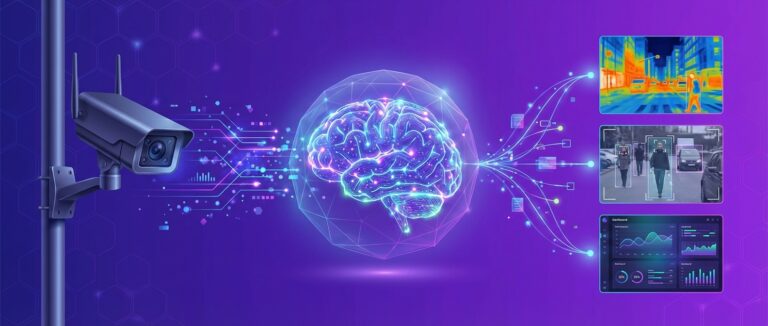
Understanding how video analytics works is essential for any business evaluating AI-powered surveillance and operational intelligence. Behind every real-time alert, heatmap, and compliance report is a sophisticated pipeline that transforms raw camera footage into actionable insights. This guide walks through the entire video analytics pipeline — from camera capture to business intelligence — explaining each stage in detail.
Whether you are a CTO evaluating technology, a security director planning a deployment, or an operations manager seeking data-driven insights, this step-by-step explanation will give you a clear understanding of the technology powering modern video analytics platforms.
The Video Analytics Pipeline: A Complete Overview
Every video analytics system follows the same fundamental pipeline, regardless of vendor or use case. Here is the end-to-end flow:
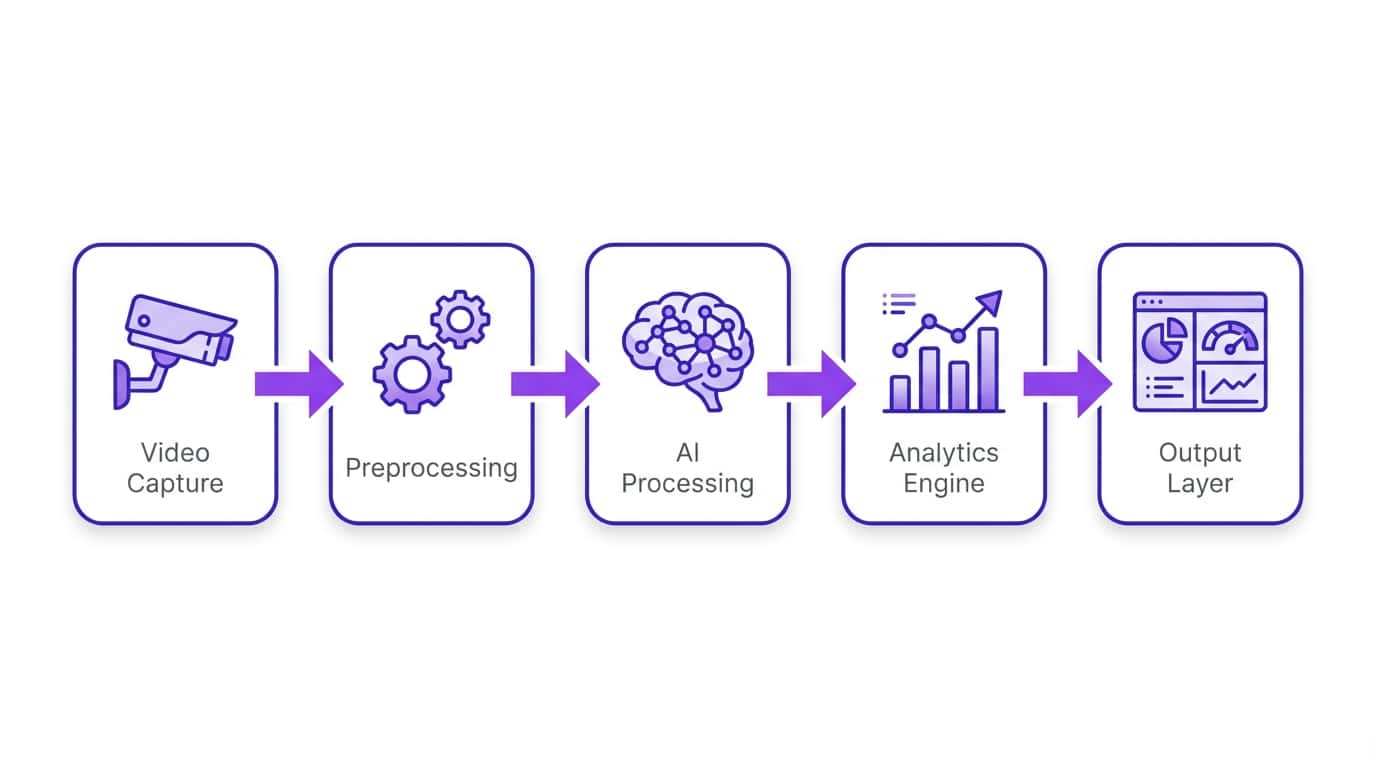
Let us examine each stage in detail.
Stage 1: Video Capture
The pipeline begins with video capture — the process of ingesting live video feeds from cameras into the analytics system. Modern platforms are designed to work with your existing camera infrastructure without hardware changes.
Camera Sources
- IP Cameras: The primary source for modern video analytics. IP cameras transmit video over ethernet or WiFi using standard protocols. Resolution ranges from 1MP to 12MP+, with 2-4MP being the sweet spot for most analytics tasks.
- Network Video Recorders (NVRs): Analytics platforms can pull feeds from NVRs that aggregate multiple camera streams, useful for retrofitting existing installations.
- Analog Cameras via Encoders: Legacy analog CCTV cameras can be connected through IP video encoders that digitize the analog signal. This extends the life of existing investments.
- Edge Devices: Some deployments use edge computing devices (NVIDIA Jetson, Intel NUC) co-located with cameras for on-site processing.
Streaming Protocols
The two primary protocols for video stream ingestion are:
- RTSP (Real-Time Streaming Protocol): The industry standard for IP camera streaming. Nearly every IP camera supports RTSP, making it the most universal integration method.
- ONVIF (Open Network Video Interface Forum): An open standard that provides a common interface for IP cameras from different manufacturers, including stream discovery, PTZ control, and event handling.
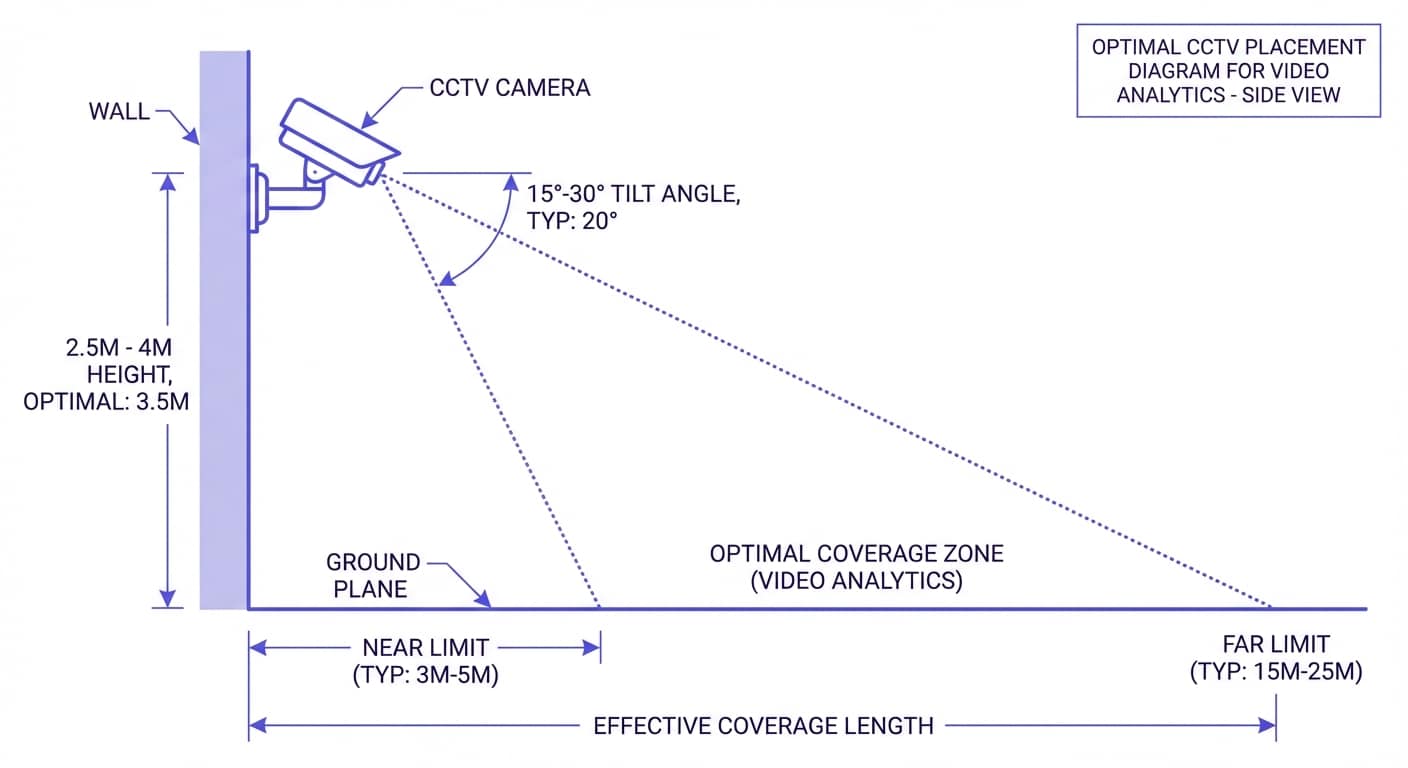
Camera Placement Considerations for Analytics
Camera placement significantly impacts analytics accuracy. Key guidelines include:
- Mounting height: 2.5-4 meters for people analytics; higher for wide-area coverage
- Angle: 15-30 degree downward tilt for optimal face and body detection
- Resolution at subject: Minimum 80 pixels per meter for reliable person detection; 200+ pixels per meter for facial recognition
- Lighting: Consistent illumination (200+ lux) for daytime; IR illumination or low-light cameras for nighttime
- Field of view: Wider views cover more area but with lower per-pixel resolution; narrow views provide detail at distance
Stage 2: Data Preprocessing
Raw video feeds are not directly suitable for AI processing. The preprocessing stage prepares frames for efficient and accurate analysis.
Frame Extraction
Not every frame needs analysis. Video analytics systems typically process 5-15 frames per second (fps) rather than the full 25-30 fps camera output. This optimization reduces compute requirements by 50-80% while maintaining detection accuracy for most use cases. For high-speed scenarios like vehicle tracking, higher frame rates (15-25 fps) may be used.
Resolution Normalization
AI models expect input at specific resolutions. A camera outputting 4K (3840×2160) frames will have those downscaled to the model’s input size — typically 416×416, 640×640, or 1280×1280 pixels depending on the model architecture. This standardization ensures consistent processing regardless of camera resolution.
Image Enhancement
Preprocessing may include automatic adjustments to improve AI model performance:
- Noise reduction: Particularly important for low-light and high-ISO footage
- Contrast normalization: Compensates for varying lighting conditions throughout the day
- Image stabilization: Corrects for camera shake on PTZ and outdoor cameras
- Defogging/dehazing: Enhances visibility in adverse weather conditions
Region of Interest (ROI) Filtering
Operators define specific zones within the camera view for analysis. Only pixels within these ROIs are processed, further reducing compute requirements and eliminating irrelevant detections outside the area of interest — for example, ignoring a public road visible in the background of a parking lot camera.
Stage 3: AI Processing
This is the intelligence core of the pipeline, where deep learning models analyze preprocessed frames to detect, classify, and understand objects and events.
Object Detection
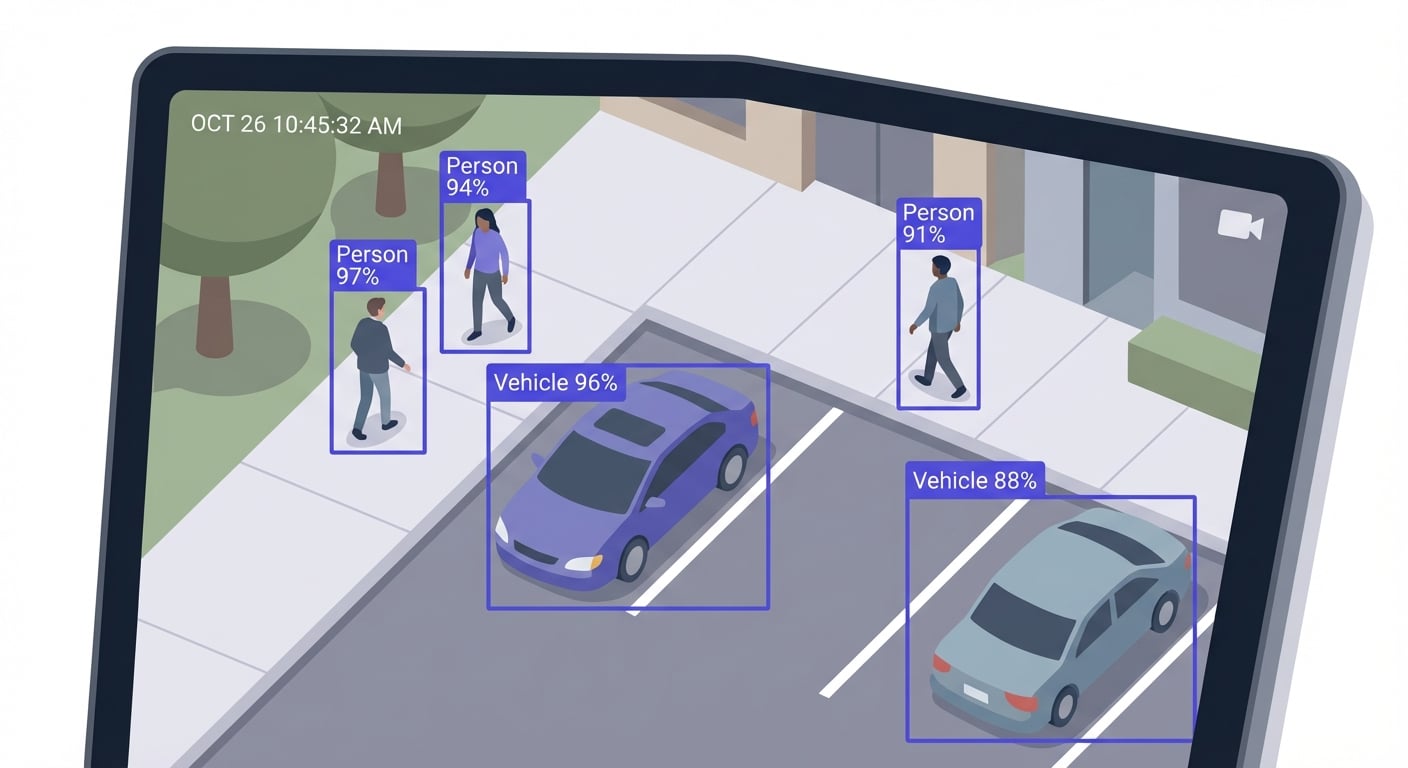
The first AI task is identifying what objects are present in each frame and where they are located. Modern systems use deep learning architectures purpose-built for real-time detection:
- YOLO (You Only Look Once): The dominant architecture for real-time video analytics. YOLO processes the entire image in a single pass, detecting all objects simultaneously. Current versions (YOLOv8, YOLO11) achieve 95%+ accuracy while processing frames in 10-30 milliseconds on GPU hardware.
- SSD (Single Shot MultiBox Detector): An alternative single-pass detector that offers strong accuracy with lower computational requirements, making it popular for edge deployments.
- EfficientDet: Google’s scalable detection architecture that offers a family of models from lightweight (mobile) to high-accuracy (server), useful for platforms supporting both edge and cloud deployment.
Each detection produces a bounding box (coordinates), a class label (person, car, forklift), and a confidence score (0.0 to 1.0). Detections below a confidence threshold — typically 0.5-0.7 — are discarded to reduce false positives.
According to NIST’s Face Recognition Vendor Test (FRVT), the most accurate face recognition algorithms now achieve error rates below 0.1%, representing a 50x improvement over 2014 benchmarks.
Object Tracking
Detection tells you what is in each frame; tracking tells you which detection corresponds to which across frames. This is critical for:
- Counting unique individuals rather than counting the same person multiple times
- Measuring how long someone stays in an area (dwell time)
- Generating movement paths and trajectories
- Maintaining identity across camera handoffs in multi-camera systems
The standard tracking algorithm is DeepSORT, which combines:
- Kalman Filter: Predicts where an object will be in the next frame based on its current position and velocity
- Hungarian Algorithm: Optimally matches predicted positions to actual detections
- Appearance Features: A deep learning model extracts visual features (what someone looks like) to re-identify them after occlusions or camera switches
Classification & Attribute Recognition
Beyond detecting that an object is a “person,” AI models extract additional attributes:
- Demographic estimation: Approximate age group, gender
- Clothing attributes: Color, type (helpful for forensic search)
- PPE detection: Hard hat, safety vest, goggles, gloves
- Vehicle attributes: Make, model, color, license plate
- Object state: Door open/closed, package present/absent
Pose Estimation & Action Recognition
Advanced AI models go beyond detecting objects to understanding human body poses and actions:
- Skeleton detection: Identifies 17+ body keypoints (joints) to create a pose skeleton
- Action classification: Uses temporal sequences of poses to classify activities — walking, running, falling, fighting, sitting, lifting
- SOP compliance: Verifies that workers follow correct procedures by analyzing body movement sequences
Stage 4: Analytics Engine
Raw AI detections are transformed into business-relevant metrics by the analytics engine. This layer applies domain logic to convert “Person detected at coordinates (x,y)” into “12 customers currently in the electronics aisle.”
People Counting
Virtual lines drawn across entrances/exits count unique individuals entering and leaving. Combined with tracking, this provides:
- Real-time occupancy: Current number of people in a space
- Footfall trends: Hourly, daily, weekly traffic patterns
- Conversion rate: Entries vs. purchases (when combined with POS data)
- Accuracy: 95-98% with modern deep learning models
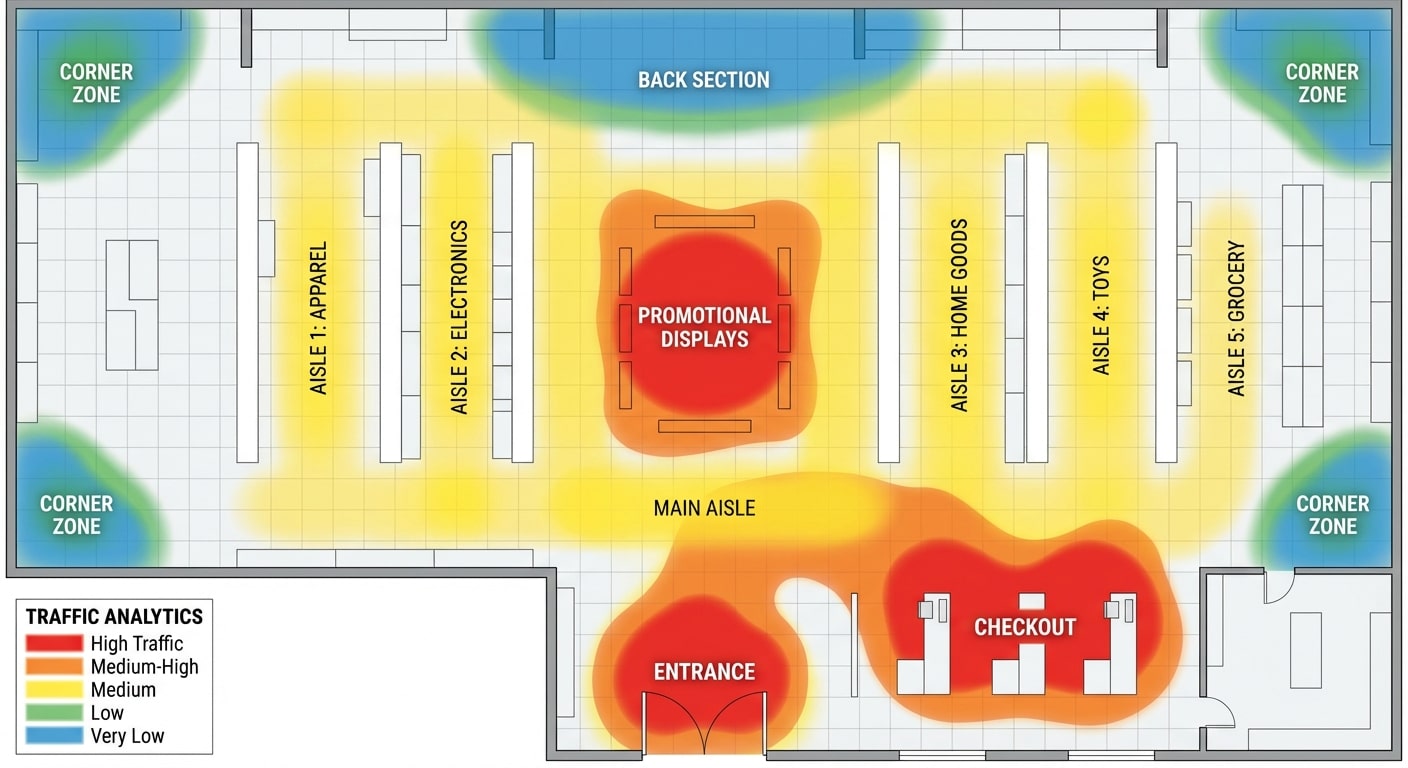
Heatmaps
By aggregating position data across thousands of detections over time, the system generates spatial heatmaps showing where people spend time. Retail stores use heatmaps to identify high-traffic zones, dead zones, and customer engagement patterns with displays and product categories.
Dwell Time Analysis
Tracking how long individuals remain in specific zones provides insights like:
- Average time customers spend in different store sections
- Queue waiting times at checkout or service counters
- Loitering detection for security applications
- Employee time-in-zone for productivity analysis
Event Detection & Alerting
The analytics engine detects complex events by combining multiple detection signals:
- Intrusion: Person detected in restricted zone outside permitted hours
- Crowd formation: Density exceeding threshold in an area
- Abandoned object: Stationary object with no associated person for X minutes
- Safety violation: Person detected without required PPE in a designated zone
- Fight/aggression: Rapid pose changes and close proximity between individuals
Stage 5: Output Layer
The final stage delivers analytics results to users and systems in actionable formats.
Real-Time Dashboards
Web-based dashboards display live metrics — occupancy counts, active alerts, camera feeds with AI overlays, and KPI trends. Advanced platforms like Agrex AI provide a chat-based interface where users can ask questions in natural language: “What was the footfall at Store 15 yesterday between 2-5 PM?”
Alerts & Notifications
When the analytics engine detects events matching configured rules, it pushes alerts through multiple channels:
- Mobile push notifications for field personnel
- Email alerts for managers and stakeholders
- SMS for critical security events
- Webhook notifications to third-party systems
- Audio alarms for on-site response
Reports & Analytics
Scheduled and on-demand reports aggregate data over time periods for strategic decision-making. Common reports include daily footfall summaries, weekly safety compliance scorecards, monthly customer behavior trends, and quarterly operational efficiency metrics.
API Integrations
REST APIs enable video analytics data to flow into existing enterprise systems:
- POS systems: Correlate footfall with sales transactions for conversion analysis
- Building Management Systems: Trigger HVAC and lighting based on occupancy
- ERP/WMS: Feed warehouse throughput data into logistics planning
- SIEM/SOC: Forward security alerts to centralized security operations
Edge vs. Cloud Processing
One of the key architectural decisions in video analytics deployment is where the AI processing happens:
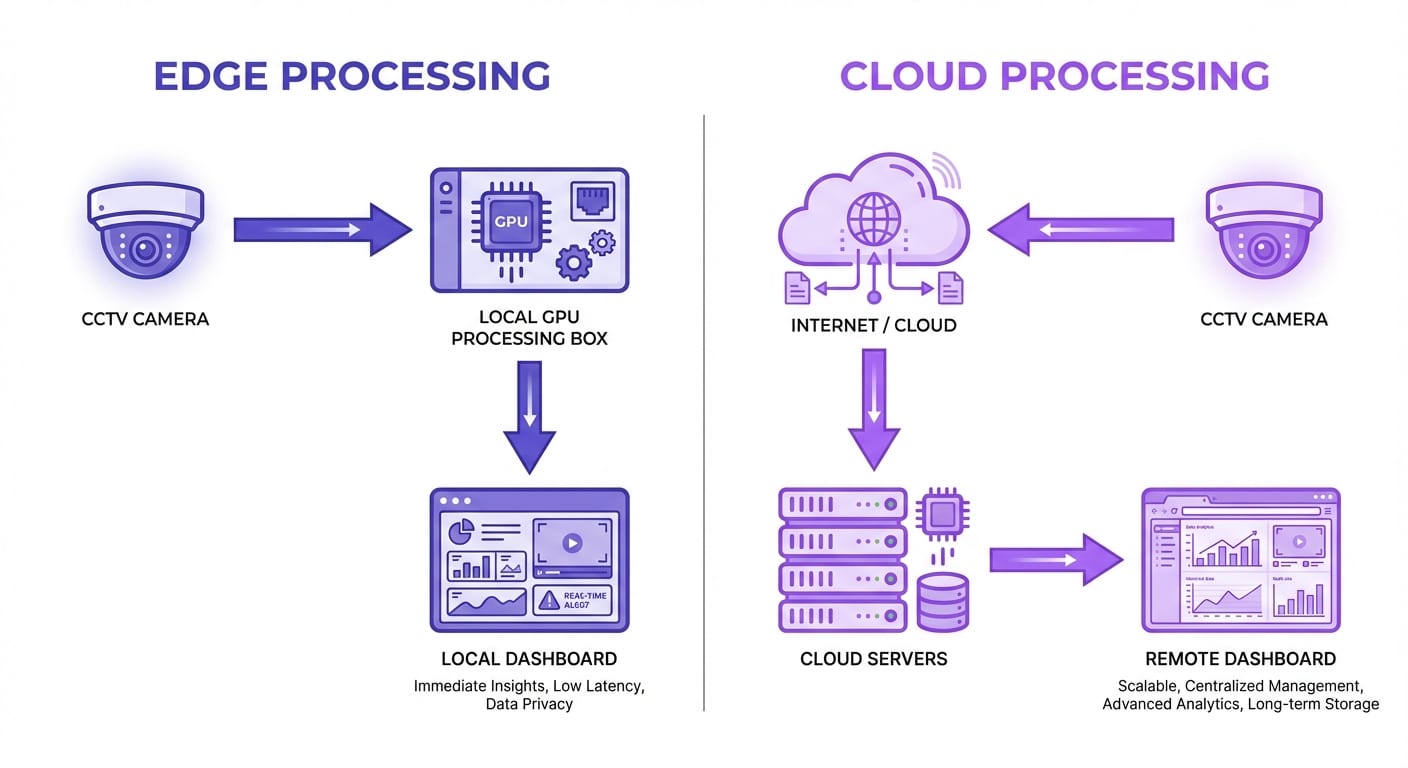
Edge Processing
AI models run on hardware located at the camera site — typically NVIDIA Jetson devices, Intel NUCs, or dedicated analytics appliances.
- Advantages: Low latency (sub-second), works offline, minimal bandwidth requirements, data stays on-premises
- Limitations: Higher upfront hardware costs, limited processing power per site, harder to update models across many locations
- Best for: Real-time safety alerts, bandwidth-constrained sites, data-sensitive environments
Cloud Processing
Camera feeds are streamed to centralized cloud servers where GPU clusters run AI models.
- Advantages: Unlimited compute scalability, centralized management, easier model updates, lower upfront costs
- Limitations: Requires reliable internet bandwidth, higher latency (1-5 seconds), ongoing cloud compute costs
- Best for: Multi-site enterprises, analytics requiring cross-location aggregation, organizations wanting OpEx over CapEx
Hybrid Processing
Most enterprise platforms — including Agrex AI — use a hybrid approach: time-sensitive analytics (safety alerts, intrusion detection) run at the edge, while aggregated analytics (trends, reports, cross-site comparisons) run in the cloud. This balances latency, cost, and capability. According to industry benchmarks, GPU-accelerated video analytics pipelines can process up to 30 camera streams simultaneously on a single NVIDIA T4 GPU, making enterprise-scale deployments cost-effective.
Real-Time vs. Batch Processing
Video analytics can operate in two modes:
- Real-Time (Streaming): Processes live feeds continuously. Essential for security alerts, safety compliance, and operational monitoring. Typical latency: 100ms-5 seconds from event to alert.
- Batch (Forensic): Processes recorded footage for post-event analysis. Used for forensic investigation, historical trend analysis, and model training. Can process footage faster than real-time when not constrained by live feed timing.
Most deployments use both — real-time for operational monitoring and batch for historical analysis and reporting.
| Feature | Real-Time | Batch |
|---|---|---|
| Latency | 100ms – 5s | Minutes – hours |
| Use Case | Live monitoring, alerts | Forensic search, reporting |
| Data Source | Live camera feeds | Recorded footage |
| Speed | Constrained by live feed | Faster than real-time |
| Best For | Security, operations | Investigations, trend analysis |
Factors Affecting Video Analytics Accuracy
Understanding what impacts accuracy helps you optimize your deployment:
- Camera Resolution: Higher resolution provides more pixels per object, improving detection accuracy. 2MP minimum is recommended; 4MP is ideal for most use cases.
- Lighting Conditions: Consistent, adequate lighting significantly improves accuracy. IR cameras or supplemental lighting help in low-light scenarios.
- Camera Angle: Extreme angles (directly overhead or nearly horizontal) reduce detection accuracy. A 15-30 degree downward angle provides optimal results.
- Occlusion: Objects blocking other objects reduce tracking accuracy. Multiple camera angles covering the same area help mitigate this.
- Model Training Data: Models trained on data similar to your environment perform better. Custom fine-tuning on site-specific footage can improve accuracy by 5-15%.
- Scene Complexity: Dense crowds, cluttered environments, and rapid movement increase processing difficulty and may reduce accuracy by 5-10%.
According to the National Institute of Standards and Technology (NIST), top-performing face recognition algorithms now exceed 99% accuracy under controlled conditions, with significant improvements in handling diverse demographics and challenging conditions.
Start Understanding Your Video Data
The video analytics pipeline is sophisticated, but implementing it does not have to be complex. Modern platforms like Agrex AI handle all five stages — from camera ingestion to actionable dashboards — as a managed service. You bring your cameras; the platform delivers intelligence.
Agrex AI’s Agentic AI platform processes 150,000+ camera feeds across 100+ enterprises, delivering real-time insights through an intuitive chat-based interface that anyone can use.
Book a Free Demo — See How Video Analytics Works on Your Cameras →
Frequently Asked Questions
How fast does video analytics process footage?
Modern AI models like YOLO process individual frames in 10-30 milliseconds, enabling real-time analysis at 15-30+ frames per second. End-to-end latency from event occurrence to alert delivery ranges from 100 milliseconds (edge processing) to 1-5 seconds (cloud processing), depending on network conditions and deployment architecture.
Does video analytics require a lot of internet bandwidth?
It depends on the deployment model. Edge processing requires minimal bandwidth since AI runs locally — only metadata and alerts are transmitted (kilobytes). Cloud processing requires streaming video to servers, typically 2-8 Mbps per camera depending on resolution and compression. Hybrid architectures optimize bandwidth by processing at the edge and sending only relevant clips or metadata to the cloud.
Can video analytics work at night or in low light?
Yes. Modern AI models are trained on diverse lighting conditions including nighttime footage. When paired with IR (infrared) cameras or thermal cameras, video analytics maintains high accuracy in complete darkness. Some AI models are specifically designed for low-light performance, using techniques like image enhancement preprocessing to boost detection accuracy.
How accurate is people counting with video analytics?
AI-based people counting achieves 95-98% accuracy in typical environments. Accuracy is highest in well-lit spaces with clear camera views and moderate density. Performance can decrease in very dense crowds (below 90%) or extreme angles. Modern deep learning counters significantly outperform legacy beam-break or thermal counters, which typically achieve only 85-90% accuracy.
What hardware do I need to run video analytics?
For cloud-based platforms, you only need your existing IP cameras and internet connectivity — all processing happens on the provider’s servers. For edge processing, you need GPU-equipped devices like NVIDIA Jetson (processing 4-16 cameras each) or dedicated analytics appliances. Most enterprise deployments use a hybrid approach where the platform manages the infrastructure and you simply connect your camera feeds.
What is the difference between edge and cloud video analytics?
Edge video analytics processes video directly on or near the camera using embedded AI chips, offering low latency and reduced bandwidth usage. Cloud video analytics streams footage to centralized servers for processing, providing more computational power and easier model updates. Most enterprise deployments use a hybrid approach — edge devices handle real-time detection and filtering while the cloud manages deep analytics, storage, and cross-camera correlation.
How accurate is AI-powered video analytics?
Modern AI video analytics achieves 95-99% accuracy for common tasks like person detection, vehicle recognition, and crowd counting. According to NIST benchmarks, top-tier face recognition algorithms exceed 99.5% accuracy under controlled conditions. Accuracy depends on camera quality, lighting, model training data, and environmental conditions. Real-world deployments typically maintain 90-97% accuracy after proper calibration and site-specific fine-tuning.
Can video analytics process live CCTV feeds in real-time?
Yes, modern video analytics platforms process live CCTV feeds in real-time with latency as low as 50-200 milliseconds. Edge-based solutions achieve the lowest latency by processing on-device, while cloud solutions typically add 1-3 seconds for network transmission. Enterprise platforms can process hundreds of concurrent camera feeds simultaneously using GPU-accelerated servers, enabling real-time monitoring across large facility networks.
What programming languages are used in video analytics?
Python is the dominant language for video analytics development, used with frameworks like OpenCV, TensorFlow, and PyTorch for AI model training and inference. C++ is used for performance-critical edge deployments and real-time processing engines. JavaScript/TypeScript powers web-based dashboards and visualization layers. CUDA (NVIDIA) enables GPU-accelerated processing. Most commercial platforms combine multiple languages — Python for AI, C++ for core processing, and web technologies for the user interface.
Does video analytics require GPU hardware?
GPU hardware significantly accelerates video analytics but is not always mandatory. For real-time processing of multiple camera feeds, NVIDIA GPUs (T4, A10, or RTX series) are recommended — they can process 10-50x faster than CPUs alone. Edge deployments use specialized AI accelerators like NVIDIA Jetson or Intel Movidius. Some lightweight models run efficiently on modern CPUs for single-camera setups. Cloud platforms like AWS and Azure offer GPU instances that eliminate the need for on-premise GPU hardware.